USB & Smartphone Borescope — iPhone & Android Endoscope Cameras
Plug in and look. A Ralcam borescope for iPhone or Android turns the phone already in your pocket into an HD inspection camera — connected by cable, so there is no pairing, no Wi-Fi network to join, and no signal to drop in a crawlspace.


Original price
$199.00
Original price
$199.00
-
Original price
$199.00
Original price
$199.00
$99.99
-
$189.00
$99.99
-
$189.00
Current price
$99.99
Endoscope Camera for Android & iPhone – Ralcam F408A
Ralcam
In stock
Ralcam F408A — Phone-Connected Articulating Borescope with Built-In Battery The F408A turns your iPhone or Android into a professional inspection c...
View full details
Original price
$199.00
Original price
$199.00
-
Original price
$199.00
Original price
$199.00
$99.99
-
$189.00
$99.99
-
$189.00
Current price
$99.99
Save up to 50%


Original price
$199.99
Original price
$199.99
-
Original price
$199.99
Original price
$199.99
$119.99
-
$159.99
$119.99
-
$159.99
Current price
$119.99
Smartphone Borescope – Ralcam H406A | 6.2mm Engine Inspection
Ralcam
Out of stock
Ralcam H406A — Detachable Smartphone Borescope with Built-In Battery The H406A uses the same concept as the F408A — phone as your display, probe as...
View full details
Original price
$199.99
Original price
$199.99
-
Original price
$199.99
Original price
$199.99
$119.99
-
$159.99
$119.99
-
$159.99
Current price
$119.99
Sold out


Original price
$249.99
-
Original price
$269.99
Original price
$249.99
-
$269.99
$249.99
-
$269.99
Current price
$249.99
Endoscope for iPhone & Android – Ralcam F606A | 4-Way
Ralcam
Out of stock
Ralcam F606A — 4-Way Articulating Borescope for iPhone and Android The F606A gives you full 4-way 360° articulation through your phone — the same i...
View full details
Original price
$249.99
-
Original price
$269.99
Original price
$249.99
-
$269.99
$249.99
-
$269.99
Current price
$249.99
Sold out


Original price
$69.99
-
Original price
$79.99
Original price
$69.99
-
$79.99
$69.99
-
$79.99
Current price
$69.99
USB Endoscope – Ralcam C106 | 6.2mm Flexible Engine Inspection
Ralcam
Out of stock
Ralcam C106 — USB Endoscope for iPhone, Android and Tablets No battery to charge, no app to pair. The C106 draws power over USB OTG from your phone...
View full details
Original price
$69.99
-
Original price
$79.99
Original price
$69.99
-
$79.99
$69.99
-
$79.99
Current price
$69.99
Sold out
The Lightest Way to Get a Camera In There
A phone borescope is the smallest, cheapest, and most packable option in the range — a probe, a cable, and a connector. It is the right choice when you already carry a phone to every job, when you need something that lives in a glovebox, or when you are buying your first inspection camera and would rather not pay for a screen. Your phone is usually the biggest, sharpest display you own, and photos and video save straight to your camera roll, ready to text to a customer or attach to a warranty claim.
How a Phone Endoscope Camera Connects
Every model in this collection connects by cable and works with both iPhone and Android — phones and tablets alike: iPhone and iPad over Lightning or USB-C, Android over USB-C. There is no Wi-Fi version in the range, and that is deliberate: a wired connection shows the picture the moment you plug in, with no hotspot to join, no range limit, and no lag between moving the tip and seeing it move.
These are phone and tablet cameras. They are not designed to display on a computer — if you need to review footage on a laptop, record on your phone and transfer the files, or choose a borescope with a built-in screen that records to a TF card.
Power: it will not drain your phone
The F408A, H406A, and F606A carry their own rechargeable battery. The camera and LEDs run from the scope, not from your phone, so charge the scope before the first job the same way you would any cordless tool. A scope that shows a dark image is almost always a flat battery rather than a fault. The C106 is the exception: it has no battery and draws a small amount of power from the phone it is plugged into, which is what makes it the lightest unit in the range.
Phone Borescope Models Compared
| Model | Steering | Probe | Cable | Power | Best for |
|---|---|---|---|---|---|
| F408A | 2-way, 180° | 5.5 or 8.5 mm | 1.5 m flexible or 1 m rigid | Built-in battery | First scope, glovebox kit, general engine and household checks |
| H406A | 2-way, 180° | 6.2 or 8.5 mm, detachable | 1 m, 2 m, 3 m or custom | Built-in battery | Mobile mechanics who need different lengths from one handset |
| F606A | 4-way, 360° joystick | 6.2 mm | 1 m or 2 m flexible | Two 4400 mAh batteries | Valve, turbine, and multi-bend work that needs full tip control |
| C106 | 2-way | 6.2 or 8.5 mm | 1 m flexible | No battery — powered by the phone | A low-cost spare for every van in a fleet |
All four stream 1280×720 HD, have adjustable LEDs, and carry an IP67 rating on the probe and cable. Probe size follows the hole you have to get through: 5.5–6.2 mm for spark plug holes and sink traps, 8.5 mm when there is room and you want more light. For a full walkthrough, see the probe diameter guide.
Cell Phone Borescope or Built-In Screen?
| Phone-connected borescope | Borescope with screen | |
|---|---|---|
| Display | Your phone or tablet | Built-in 3.5"–5" screen |
| Recording | Straight to your camera roll | To a TF card |
| Hands | One hand on the probe, one on the phone | One self-contained unit |
| Wet or greasy jobs | Your phone is exposed | Phone stays in your pocket |
| Price and size | Lowest cost, smallest kit | More to carry, faster to start |
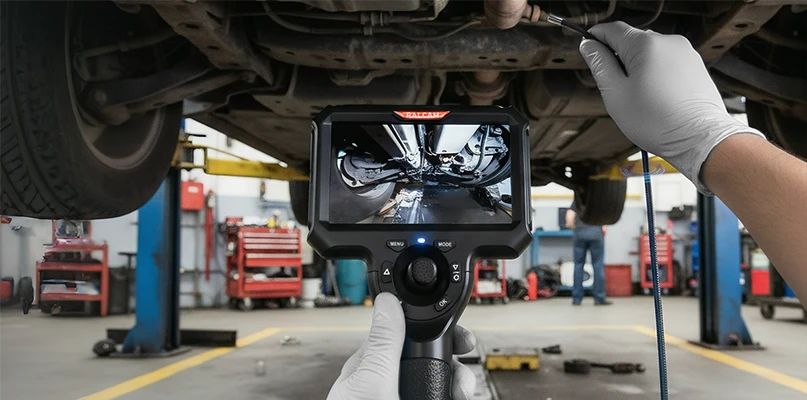
If you work in wet conditions, wear gloves, or need to record without tying up your phone, a borescope with a built-in screen is the more practical tool. If you already carry your phone everywhere and want the lightest kit, stay here.
What People Inspect With an iPhone Borescope
Mechanics use it through the spark plug hole to check piston crowns, cylinder walls, and carbon on the valves — see how to inspect engine cylinders. Homeowners use it to look inside walls before drilling, to find what dropped behind an appliance, or to check a sink trap before calling a plumber. HVAC technicians use it to check ducts and coils. For steering, 2-way articulating covers most of these jobs; 4-way articulating is for work where you need to look back along a surface.
Before You Buy: Compatibility Checklist
- Phone or tablet: every model works with iPhone and iPad (Lightning or USB-C) and with Android phones and tablets (USB-C).
- Connector: the F408A, H406A, and F606A ship with both USB-C and Lightning adapters.
- App: a free companion app shows the live image and saves photos and video — no account. The app name is in each product manual.
- No Wi-Fi, no computer display: every model here is a wired phone camera.
- Charge first: self-powered models need a full charge before the first use.